Best Lenovo Tablets in India: Idea Tab to Idea Tab Pro Compared
Lenovo has quietly built one of the more interesting tablet ranges in India, spanning a genuinely budget entry point up to a 144Hz, stylus-equipped model that competes with Samsung’s premium tablets at a lower price. The naming is where it gets confusing – Tab, Idea Tab, Idea Tab Pro and Tab Plus all sound similar but represent very different tiers.
The short version: the base Lenovo Tab is entry-level and Wi-Fi only. Idea Tab and Idea Tab Pro add better displays, RAM and increasingly a stylus. Tab Plus sits in the upper-middle with strong speakers and a kickstand built for media consumption. I’ve covered the current range honestly, including which rung most people should actually stop at.
How Lenovo’s tablet range breaks down
Four things worth deciding before the model.
- Decide if you need an S Pen-equivalent stylus. Lenovo’s Idea Tab Pro models bundle a pen for note-taking and sketching. If that’s not a real use case for you, the base Idea Tab or Lenovo Tab covers browsing, video and casual apps without paying for stylus support you won’t use.
- Refresh rate is a genuine, noticeable upgrade at 90Hz and above. Scrolling and video feel considerably smoother on Lenovo’s 90Hz and 144Hz tablets than on older 60Hz panels. It’s one of the specs you’ll actually notice every single time you pick up the tablet, unlike many marketing bullet points.
- RAM matters more on a tablet than people expect. 4GB is fine for single-app, casual use. If you plan to multitask, keep several browser tabs open, or do any real work on the tablet, 8GB or more – which Lenovo’s Idea Tab and Idea Tab Pro models offer – makes a genuine day-to-day difference.
- Speaker count and placement matter more than people realise for video consumption. If the tablet’s main job is watching video or video calls, models with four speakers and Dolby Atmos, like Lenovo’s higher-end options, deliver a meaningfully better experience than the basic two-speaker setup on entry tablets.
The best Lenovo tablets you can buy right now
Lenovo Idea Tab Smartchoice with Pen – the best all-rounder

This is the tablet I’d point most people at. An 11 inch 2.5K display with a bundled pen, 8GB of RAM, 256GB of storage and 5G plus Wi-Fi connectivity covers essentially every common use case – media, note-taking, browsing, light productivity – without needing to step up to Lenovo’s most expensive tier.
It carries a large accumulated base of owner feedback and strong ratings, reflecting genuine satisfaction at this price point. The included pen means you’re not paying extra for stylus support later if you decide you want it.
Best for: Most buyers who want a genuinely capable tablet with stylus support and 5G.
- 👍 11 inch 2.5K display with 500 nits brightness is genuinely sharp
- 👍 Pen included in the box, not a separate purchase
- 👍 8GB RAM and 256GB storage handle real multitasking comfortably
- 👍 5G plus Wi-Fi means it works independently of home internet
- 👍 Large accumulated base of owner feedback with strong ratings
- 👎 More expensive than the base Lenovo Tab models
- 👎 Not as fast as the top-tier Idea Tab Pro for heavy productivity work
- 👎 5G connectivity requires an active data plan to use fully
- 👎 Mid-tier MediaTek chipset, not flagship-level performance
Lenovo Tab Smartchoice (128GB) – the accessible entry point
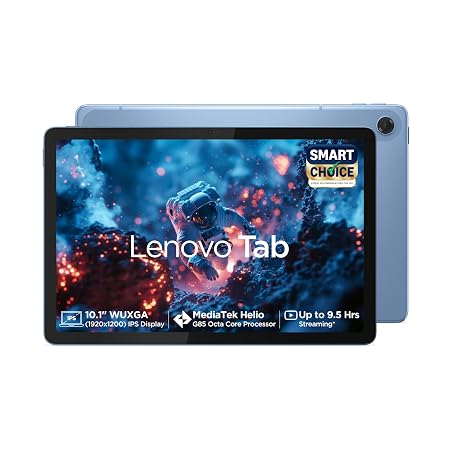
This is Lenovo’s accessible entry point, and the metal body is a genuine step up in feel from the plastic construction typical at this price. Dual speakers with Dolby Atmos make it decent for video, which is what most budget tablet buyers actually use it for most of the time.
4GB of RAM keeps it firmly in casual-use territory – browsing, video, light apps – rather than heavy multitasking, but for that use case it’s a sensible, well-built budget choice with a solid accumulated review base.
Best for: Buyers who want a simple, affordable tablet for video, browsing and casual apps.
- 👍 Metal body feels more premium than typical budget tablet plastic
- 👍 Dual speakers with Dolby Atmos suit video consumption well
- 👍 128GB storage is generous at this price point
- 👍 Solid accumulated base of owner feedback
- 👍 Sensible entry price into Lenovo’s tablet range
- 👎 4GB RAM is limiting for anything beyond casual single-app use
- 👎 Wi-Fi only, no cellular option on this variant
- 👎 10.1 inch display and refresh rate are basic compared to the Idea Tab line
- 👎 No stylus support
Lenovo Idea Tab Pro with Pen Plus – the productivity-focused flagship
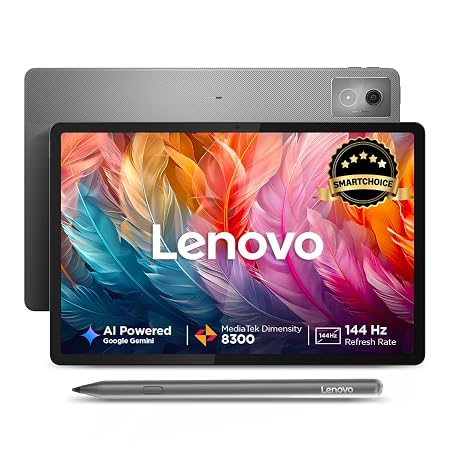
This is Lenovo’s most serious tablet in this roundup – a 12.7 inch 3K display running at 144Hz, 12GB of RAM, quad JBL speakers and a 45W charger, all built around genuine productivity and creative use rather than casual media consumption. The bundled pen is aimed squarely at note-taking, sketching and annotation work.
It carries strong owner ratings and represents Lenovo’s answer to Samsung’s premium S-series tablets, at a generally lower price for comparable specifications.
Best for: Buyers who want Lenovo’s most capable tablet for genuine productivity and creative work.
- 👍 12.7 inch 3K display at 144Hz is genuinely premium
- 👍 12GB RAM handles serious multitasking and creative apps
- 👍 Quad JBL speakers with Dolby Atmos for excellent media playback
- 👍 Pen included for note-taking and sketching
- 👍 Strong owner ratings for a genuinely capable productivity tablet
- 👎 Most expensive Lenovo tablet in this roundup
- 👎 Overkill if your use case is mainly casual browsing and video
- 👎 Larger and heavier than the smaller Idea Tab models
- 👎 MediaTek Dimensity 8300 is capable but not flagship Snapdragon-tier
Lenovo Tab Smartchoice (64GB) – the lower-storage budget variant
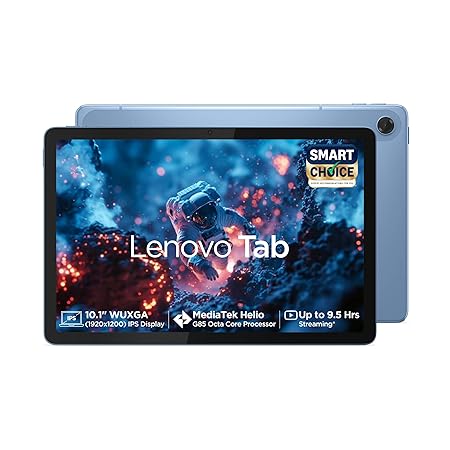
This shares the same metal body, display and Dolby Atmos speakers as the 128GB variant above, at a slightly lower price for less storage. If you’re mainly streaming rather than downloading large amounts of content locally, 64GB with expandable storage up to 1TB is a perfectly workable compromise for the savings.
It carries the same solid owner feedback base as its 128GB sibling, since the core hardware is identical – the storage tier is really the only decision point between the two.
Best for: The tightest possible budget, where 64GB of storage is genuinely enough.
- 👍 Same metal body and Dolby Atmos speakers as the 128GB variant, for less
- 👍 Expandable storage up to 1TB compensates for the lower base storage
- 👍 Solid, shared owner feedback base with the 128GB version
- 👍 Sensible choice if you mainly stream rather than download locally
- 👍 Lowest entry price in Lenovo’s current tablet range
- 👎 64GB fills up quickly if you download apps and media locally
- 👎 Same 4GB RAM limitation as the 128GB variant
- 👎 No meaningful hardware difference beyond storage from the pricier option
- 👎 Wi-Fi only, no cellular
Lenovo Idea Tab Pro Gen 2 with Pen Plus – the newest, most refined flagship
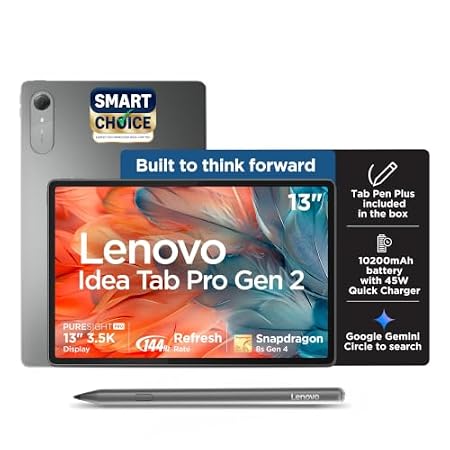
This is the newest addition to Lenovo’s tablet range, stepping up to a 13 inch 3.5K display and a Snapdragon 8s Gen 4 chipset – a genuine flagship-tier processor rather than the MediaTek chips used elsewhere in the range. Wi-Fi 7 and USB 3.0 with DisplayPort output round out a spec sheet aimed at serious productivity use.
It’s a recent launch with a more modest review base so far, reflecting its newness rather than any quality concern. For buyers who want the latest and are comfortable being early adopters, this is Lenovo’s current top tier.
Best for: Buyers who want Lenovo’s very latest tablet technology and don’t mind paying for it.
- 👍 13 inch 3.5K display at 144Hz is Lenovo’s sharpest tablet screen
- 👍 Snapdragon 8s Gen 4 is genuine flagship-tier performance
- 👍 Wi-Fi 7 and USB 3.0 with DisplayPort support serious productivity use
- 👍 Quad JBL speakers with excellent audio
- 👍 Represents Lenovo’s most current tablet technology
- 👎 Most recent launch, so a smaller accumulated review base so far
- 👎 Very high price, competing with premium tablets from other brands
- 👎 Overkill for casual browsing and media use
- 👎 8GB RAM is lower than the Idea Tab Pro’s 12GB despite the higher price
Frequently Asked Questions
Which Lenovo tablet should most people buy?
The Lenovo Idea Tab Smartchoice with Pen. It covers media, note-taking and browsing comfortably with 8GB of RAM, a sharp 2.5K display, and 5G plus Wi-Fi, all at a sensible mid-range price.
Do I need a Lenovo tablet with a stylus?
Only if note-taking, sketching or annotation is a real use case. The Idea Tab and Idea Tab Pro models bundle a pen; the base Lenovo Tab does not, and is fine for browsing and video without it.
What’s the difference between Idea Tab Pro and Idea Tab Pro Gen 2?
The Gen 2 steps up to a larger 13 inch 3.5K display and a genuine flagship Snapdragon 8s Gen 4 chipset, at a higher price and with less accumulated owner feedback so far, being the newer launch.
Is 4GB RAM enough on a Lenovo tablet?
For casual, single-app use like browsing and video, yes – the base Lenovo Tab models handle this fine. For real multitasking or heavier apps, step up to the 8GB or 12GB RAM on the Idea Tab line.
Which Lenovo tablet is best for productivity and creative work?
The Lenovo Idea Tab Pro with Pen Plus, with its 12GB of RAM, 144Hz 3K display and bundled pen, is built specifically for this – it’s Lenovo’s answer to Samsung’s premium productivity tablets.
Should I buy the 64GB or 128GB Lenovo Tab?
If you mainly stream content rather than download it locally, the 64GB variant with expandable storage is a reasonable saving. If you download apps and media heavily, the 128GB version avoids running out of space sooner.
The bottom line
For most buyers, the Lenovo Idea Tab Smartchoice with Pen is the sensible sweet spot – a sharp display, real RAM headroom, 5G connectivity and a bundled pen at a mid-range price. On a tighter budget, the Lenovo Tab in either storage variant covers browsing and video well. For genuine productivity and creative work, the Idea Tab Pro is worth the step up, and the Idea Tab Pro Gen 2 is for buyers who specifically want Lenovo’s newest technology and are willing to pay the premium for it.
As an Amazon Associate we earn from qualifying purchases — at no extra cost to you. We don’t print prices or ratings here because they change daily; tap through to Amazon for the current price and latest reviews.
![Samsung Galaxy Tab A11+ [Smartchoice], 27.82 cm (11 inch) Display, 6 GB RAM, 128 GB Storage, 90Hz Refresh Rate, Wi-Fi Ta](https://india.prodhut.com/wp-content/uploads/2026/07/B0G1BS9S4Q.jpg)