Best 24-Inch Monitors in India for Work, Study and Gaming
A 24-inch screen is the sensible middle ground for most Indian desks. It gives you room for a document and browser side by side without overwhelming a study table or work-from-home corner. Full HD also looks comfortably sharp at this size.
If you’re searching for the best 24 inch monitor India buyers can get for work, study and gaming, don’t choose by refresh rate alone. Panel quality, ports and stand adjustment matter too. I compared current Amazon India listings with manufacturer specifications and recurring owner feedback. These four Full HD IPS models have genuinely different strengths.
Acer suits gaming, Samsung keeps everyday use simple, LG balances colour and motion, and BenQ handles a multi-device office setup. None has a height-adjustable stand, so consider a riser or VESA arm if your desk doesn’t place the screen at eye level.
How to choose a 24-inch monitor without paying for the wrong features
Focus on the details that change daily use.
- Full HD suits 24 inches. A 1920×1080 panel gives clear text without demanding an expensive graphics card. QHD is sharper, but isn’t essential for assignments, spreadsheets or streaming.
- Refresh rate affects work too. At 100Hz or more, scrolling and window movement look smoother. Acer reaches 144Hz over HDMI, LG 120Hz, and Samsung and BenQ 100Hz. Your device and cable must support the chosen rate.
- IPS is a safe all-round choice. Colours stay more consistent when you lean sideways or share the screen. The trade-off is modest black depth compared with a good VA or OLED panel.
- Count the ports. One HDMI is fine for one computer. BenQ’s two HDMI inputs plus DisplayPort are better for several devices. None of these offers USB-C docking.
- Check ergonomics. Every stand here is tilt-only. A riser or VESA arm can improve eye level and free space on a small desk.
- Protect against power trouble. Use a decent surge protector where voltage dips are common. Consider a UPS if a sudden shutdown could cost you work.
The 24-inch monitors worth putting on your desk
Acer EK240Y P6 — the gaming-first value pick
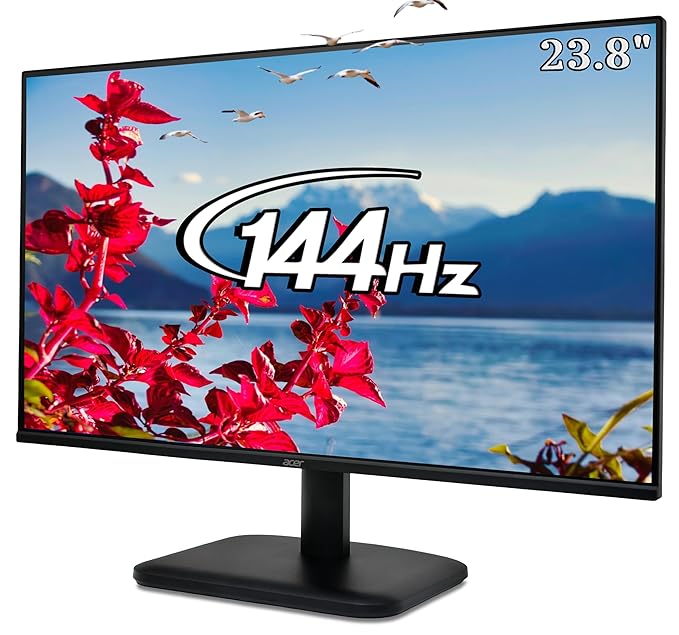
The Acer is the place to start if games sit beside classes or office work. Its 23.8-inch IPS panel runs at up to 144Hz over HDMI, with AMD FreeSync and a 1ms VRB mode. Fast camera movement and cursor tracking look cleaner than on a basic office screen. Full HD resolution, an anti-glare surface and slim bezels keep it practical for work too.
Connectivity stops at one HDMI and one VGA input, with VGA limited to 75Hz. The light stand is a recurring weak point in buyer feedback, and there are no speakers. I’d choose it for affordable desktop gaming, but not for a desk that gets bumped frequently or needs several devices connected.
Best for: Students and budget PC gamers who want the smoothest motion in this shortlist.
- 👍 144Hz over HDMI gives games and everyday motion a visibly smoother feel
- 👍 AMD FreeSync helps reduce tearing with compatible graphics hardware
- 👍 IPS panel with Full HD resolution and wide viewing angles
- 👍 HDMI cable is included, so a typical PC setup is straightforward
- 👎 One HDMI and one VGA input leave little room for multiple modern devices
- 👎 Light, tilt-only stand can wobble when the desk is nudged
- 👎 No built-in speakers for calls, classes or casual video
Samsung Essential Monitor S3 — the simple everyday choice
Samsung’s S3 is the no-drama option. The 24-inch Full HD IPS screen runs at 100Hz, a useful upgrade over 60Hz for notes, websites and spreadsheets. Eye Saver Mode reduces blue light for late study sessions, while Game Mode reveals more detail in dark scenes. Slim borders also suit a future dual-monitor setup.
You’re buying simplicity, not flexibility. The stand only tilts, and inputs are limited to one HDMI plus VGA. There is no DisplayPort, USB-C or built-in audio. That is fine for one computer, but cable swapping gets old when a console shares the desk. Pick Samsung when work and study come first; gamers get more headroom from Acer or LG.
Best for: Home-office users and students who want a clean, uncomplicated display from a familiar brand.
- 👍 100Hz refresh rate makes documents, scrolling and casual games feel smoother than 60Hz
- 👍 IPS panel keeps colours and contrast consistent from wider angles
- 👍 Eye Saver and Flicker Free modes are useful for long reading sessions
- 👍 Slim bezels suit a compact desk or future two-screen layout
- 👎 Only one HDMI plus VGA, with no DisplayPort or USB-C
- 👎 Tilt-only stand has no height, swivel or pivot adjustment
- 👎 No built-in speakers or headphone output
LG 24U411A-B — the balanced pick for colour and motion
LG lands in a useful middle spot. Its 23.8-inch IPS panel combines 120Hz with claimed 99% sRGB coverage, suiting casual gaming, photo sorting and presentation design. Dynamic Action Sync and Black Stabilizer help in games; Reader Mode and Flicker Safe matter during long document sessions.
Keep the HDR10 badge in perspective. LG specifies 250-nit typical brightness, so don’t expect the highlights of a proper high-brightness HDR display. The 1ms claim refers to Motion Blur Reduction, which lowers brightness and disables some motion features. One HDMI, one VGA and a tilt-only stand keep connectivity and ergonomics basic. This is still my balanced pick for an even split between work and play.
Best for: Mixed work, entertainment and casual gaming where colour coverage matters as much as refresh rate.
- 👍 120Hz refresh rate is smooth for both desktop use and casual gaming
- 👍 Claimed 99% sRGB coverage is useful for everyday creative work
- 👍 Reader Mode, Flicker Safe and gaming presets cover mixed use well
- 👍 Headphone output and VESA mounting add practical setup options
- 👎 Single HDMI input and VGA are restrictive for a modern multi-device desk
- 👎 250-nit brightness limits the impact of HDR content
- 👎 Stand adjusts for tilt only, and there are no built-in speakers
BenQ GW2490 — the workhorse for multiple devices
BenQ earns its place through useful everyday features. Two HDMI inputs and DisplayPort let a desktop, office laptop and console stay connected, while a dedicated switch changes sources. The 100Hz IPS panel covers a claimed 99% of sRGB. Brightness Intelligence, Coding, ePaper and low-blue-light modes suit a day spent reading text.
Acer and LG offer higher gaming refresh rates. The stand tilts but does not rise, swivel or pivot, and reviewers note some wobble. Two 2W speakers are convenient for meetings, though independent reviewers consistently describe them as thin. Buy BenQ for its ports and eye-care tools; treat the speakers as backup.
Best for: Work-from-home setups that need easy input switching, readable text and basic built-in audio.
- 👍 Two HDMI inputs plus DisplayPort accommodate three source devices
- 👍 100Hz IPS panel with claimed 99% sRGB coverage
- 👍 Brightness Intelligence, ePaper and Coding modes suit long work sessions
- 👍 Built-in speakers and a dedicated input switch reduce desk clutter
- 👎 Tilt-only stand offers no height, swivel or pivot adjustment
- 👎 Built-in speakers are convenient but sound thin
- 👎 100Hz gives keen gamers less motion headroom than the Acer or LG
Frequently Asked Questions
Is a 24-inch Full HD monitor good for office work and study?
Yes. It gives you readable text and room for two modest windows without taking over a study table. For large editing timelines or three documents at once, consider a bigger QHD screen.
Is 100Hz enough for gaming?
Yes for casual gaming, provided your PC delivers enough frames. Competitive players may prefer Acer’s 144Hz. Remember to select the higher rate in Windows; a new monitor may otherwise remain at 60Hz.
Can I connect a 24-inch monitor to a laptop?
Usually. All four accept HDMI. A laptop with only USB-C needs a video-capable adapter or dock. None of these models carries video, charging and data through one USB-C cable.
Which monitor is best for coding and reading?
The BenQ GW2490 stands out with Coding and ePaper modes, automatic brightness adjustment and flexible inputs. Whatever you choose, sensible brightness and regular breaks matter more than an eye-care badge.
Do these monitors need separate speakers?
BenQ’s built-in speakers handle calls and spoken classes, but sound thin. Acer, Samsung and LG need headphones, external speakers or laptop audio. Separate speakers are better for music and films.
Should I buy a monitor arm for a 24-inch screen?
Consider one if the tilt-only stand leaves the screen too low or you need more desk space. All four support VESA mounting; confirm the mount pattern and arm weight limit first.
The bottom line
For most people splitting their time between work, study and entertainment, I’d take the LG 24U411A-B. Its 120Hz panel and claimed 99% sRGB coverage make it the most even balance here, as long as one HDMI input is enough. Choose the Acer EK240Y P6 instead when gaming smoothness is the priority, and the Samsung S3 when you simply want a clean 100Hz everyday screen.
The BenQ GW2490 is the smarter office buy for a crowded desk because its two HDMI ports, DisplayPort and useful text modes solve real daily annoyances. Just don’t choose any of these expecting premium ergonomics or convincing HDR. They are sensible Full HD monitors, and their strongest value comes from getting the basics right at a size that works in most Indian homes.
As an Amazon Associate we earn from qualifying purchases — at no extra cost to you. We don’t print prices or ratings here because they change daily; tap through to Amazon for the current price and latest reviews.