Best HP Printers in India: Smart Tank, DeskJet and LaserJet Compared
Finding the best HP printer India buyers can live with is about print habits, not the fanciest machine. A DeskJet seems sensible for the odd school form. Print worksheets every week, though, and its small cartridges become the expensive part. A Smart Tank suits regular colour work; a monochrome LaserJet is the practical answer for stacks of black text.
I checked these exact Amazon India listings, matched key details with HP’s specifications and looked for recurring owner complaints. The Smart Tank 589 is my family pick because refillable ink and Wi-Fi work well in a shared home. The Laser MFP 323sdnw is the office choice, with automatic duplexing and a document feeder. The DeskJet 2820 stays here strictly for light use.
Decide whether you need colour, how many pages you print in a normal month and whether scanning one sheet at a time will drive you mad. Those answers matter more than a long feature list.
Smart Tank, DeskJet or LaserJet: choose by workload
Start with your normal monthly jobs, then work through these five decisions.
- Choose the ink system first. DeskJet cartridges suit occasional use. Smart Tank bottles make more sense for weekly colour printing. Laser toner is the fast, tidy choice for black invoices and notes.
- Buy the connection you need. The Smart Tank 524 is USB-only. The DeskJet 2820 and Smart Tank 589 add Wi-Fi, while the 323sdnw also has Ethernet for a dependable office network.
- Check the missing conveniences. All four print, scan and copy, but only the 323sdnw has an automatic document feeder. It is also the only pick that prints both sides automatically.
- Measure with trays open. Rear-fed inkjets need clearance for A4 paper. The heavier laser needs ventilation and room for its tray and scanner lid.
- Plan for Indian conditions. Use an earthed 230V socket and surge protection where supply fluctuates. Keep paper sealed during humid monsoons, and print a small colour page regularly so inkjet nozzles do not sit idle.
Treat the maker’s recommended workload as the useful guide, not the much higher maximum duty cycle.
The HP printers worth considering
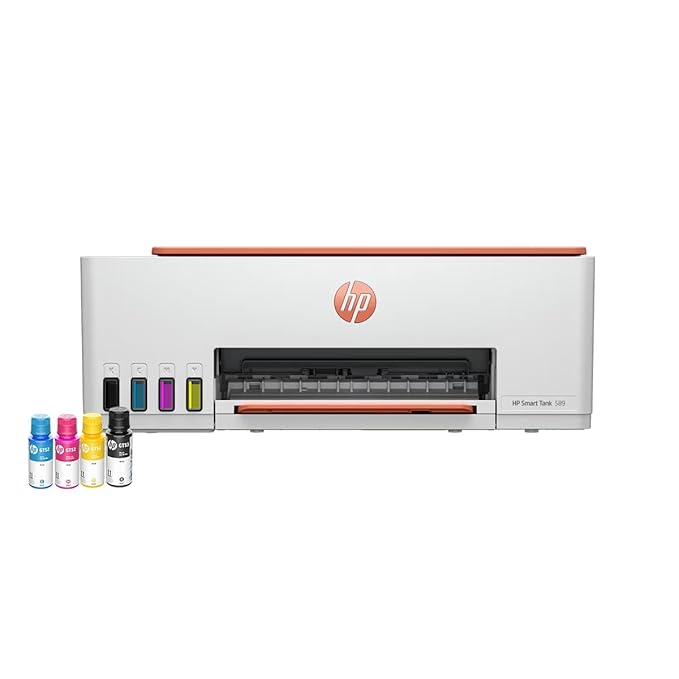
HP Smart Tank 589 — the balanced pick for most homes
The Smart Tank 589 is the easy recommendation when homework, forms and colour projects all pass through one machine. It prints, scans and copies; refillable bottles suit regular use better than tiny cartridges. Wi-Fi, Wi-Fi Direct and USB let a family share it, while visible tanks make remaining ink easy to judge.
Two-sided printing is manual, and the flatbed scans one original at a time. Owners also report that HP’s app can lose sight of the printer during wireless setup. It uses the 2.4GHz band, so check your router settings. Print regularly too, because a neglected printhead can still clog.
Best for: Families, students and home offices that print colour regularly from several devices.
- 👍 Refillable tanks suit regular colour printing
- 👍 Wi-Fi, Wi-Fi Direct and USB offer flexible sharing
- 👍 Print, scan and copy in one home-friendly machine
- 👍 100-sheet input tray reduces constant paper refills
- 👎 No automatic two-sided printing
- 👎 Flatbed scanner has no automatic document feeder
- 👎 Wireless setup and the HP app can need patience
HP Smart Tank 524 — the sensible wired tank
Think of the Smart Tank 524 as the no-network option. It gives you refillable ink, colour printing, copying and a flatbed scanner, but communicates through USB. That can be a virtue on a fixed study or billing desk: there is no router pairing to troubleshoot, and one computer controls the queue.
Don’t assume you can add phone printing later. There is no wireless radio, and a USB cable may not be included. Duplexing is manual and multi-page scans are a page-by-page job. This is a focused choice for one computer; buy the 589 if several people need access.
Best for: Regular colour printing from one Windows computer where wireless access is unnecessary.
- 👍 Refillable ink suits frequent documents and projects
- 👍 Print, scan and colour-copy functions
- 👍 Straightforward USB connection avoids Wi-Fi dropouts
- 👍 Compact enough for a fixed study desk
- 👎 No Wi-Fi, Wi-Fi Direct or phone printing
- 👎 No automatic duplex or document feeder
- 👎 A USB cable may not be included in the box
HP DeskJet 2820 — only for genuinely occasional printing
The DeskJet 2820 earns its place by being small and wireless. It prints, scans and copies over Wi-Fi or USB, and the HP app accepts jobs from a phone. For a boarding pass or short school notice, that covers the basics without surrendering much desk space.
The trap is confusing a low-commitment printer with a low-running-cost one. Buyers repeatedly flag limited cartridge yield, plus occasional connection and paper-feed trouble. There is no ADF, and duplex pages require manual turning. Choose it only for light use; for weekly worksheets or colour handouts, move to a Smart Tank.
Best for: A household printing a few forms, tickets or school notices each month.
- 👍 Compact body fits a crowded study desk
- 👍 Wi-Fi and USB connectivity
- 👍 Print, scan and copy cover basic home jobs
- 👍 HP app supports printing from a phone
- 👎 Cartridges have limited yield under regular use
- 👎 Slower than the tank and laser options
- 👎 No automatic duplex or document feeder
HP Laser MFP 323sdnw — the capable small-office choice
The 323sdnw is for contracts, invoices and long black-text PDFs. HP specifies up to 30 pages per minute, automatic duplex, a 40-sheet ADF and a 250-sheet input tray. Wi-Fi, Wi-Fi Direct, Ethernet and USB make it easy to share in an office.
It cannot print colour, and at about 11kg it needs a sturdy spot. The ADF scans only one side of each original, while Wi-Fi is limited to 2.4GHz. Toner and the imaging drum are separate consumables. Some early owners report print defects or duplex alignment issues, so inspect the first output promptly.
Best for: Small offices that need fast black printing, two-sided documents and multi-page scanning.
- 👍 Up to 30-page-per-minute black printing
- 👍 Automatic duplex saves manual page turning
- 👍 40-sheet ADF handles multi-page scans and copies
- 👍 Wi-Fi, Ethernet, Wi-Fi Direct and USB connectivity
- 👎 Prints in black and white only
- 👎 Large and heavy compared with the home inkjets
- 👎 ADF does not scan both sides automatically
Frequently Asked Questions
Which is the best HP printer in India for home use?
The HP Smart Tank 589 is the balanced pick for regular colour printing. Its refillable ink, Wi-Fi, scanner and copier suit a shared home. Choose the DeskJet 2820 only when monthly use is genuinely light.
Is an HP Smart Tank better than a DeskJet?
Smart Tank is better for regular printing because bottled ink handles a larger workload. DeskJet is compact and suits occasional forms or labels, but its cartridges empty sooner.
What is the difference between HP Smart Tank 524 and 589?
The 524 is a USB printer for one nearby computer. The 589 adds Wi-Fi and Wi-Fi Direct for shared access. Both print, scan and copy in colour with manual duplex.
Should I buy an HP LaserJet or Smart Tank for home?
Choose Smart Tank for colour projects. Choose a monochrome LaserJet for fast black text and fewer concerns about ink drying while idle. The 323sdnw cannot print colour.
Which HP printer can scan several pages automatically?
The HP Laser MFP 323sdnw has a 40-sheet ADF for multi-page scans and copies. It reads one side of each original. The other picks use flatbeds.
How do I reduce paper jams and clogged ink nozzles?
Keep paper sealed in humid weather, align the guides and avoid curled sheets. For an inkjet, print a small colour page regularly. Clean only when a nozzle check shows gaps.
The bottom line
The HP Smart Tank 589 is the winner for most Indian homes. Refillable ink, wireless sharing and all-in-one functions make it more useful than the wired 524 and better for repeat printing than the DeskJet 2820. Pick the Smart Tank 524 when one computer does all the work.
For black office documents, choose the Laser MFP 323sdnw. Its automatic duplexer, ADF and larger tray save real time. Skip it if you need colour, and skip the DeskJet if your household prints often.
As an Amazon Associate we earn from qualifying purchases — at no extra cost to you. We don’t print prices or ratings here because they change daily; tap through to Amazon for the current price and latest reviews.