Best OnePlus Tablets in India for Study, Entertainment and Work
Finding the best OnePlus tablet in India is less about choosing the biggest screen and more about being honest about what you’ll do with it. A Pad Lite is perfectly sensible for lectures, PDFs and nightly streaming. A Pad 4 has the power and screen space for demanding games, editing and serious multitasking, but carrying that much tablet to college every day is another matter.
The range now covers four genuinely different jobs. The Pad Lite is the affordable media-and-study pick. The Pad Go 2 adds a sharper display, stylus support and standalone 5G. The original OnePlus Pad remains a fast, compact all-rounder if you prefer its 11.61-inch shape. The Pad 4 sits at the premium end with flagship processing, a huge battery and a work-friendly 13.2-inch canvas.
I checked each exact listing on Amazon India during this update, then compared the hardware with OnePlus’s official specifications and recurring owner and reviewer complaints. No made-up testing, no pretending every model is brilliant. Here’s where each one makes sense, and where it doesn’t.
Which OnePlus tablet actually fits your day?
Start with your main use, then check the compromises you can live with.
- Don’t overbuy for basic use. The Pad Lite handles video classes, web research, email and two-app multitasking. Heavy games and large creative projects need more power.
- Pick 5G for life away from Wi-Fi. The Pad Go 2 5G works independently on a commute or during unreliable hostel Wi-Fi. The others need Wi-Fi or phone tethering.
- Screen shape matters. A 7:5 display shows more of documents and split-screen apps, but films have larger black bars. The Pad Lite’s 16:10 panel suits widescreen video better.
- Refresh rate isn’t everything. Smooth 120Hz or 144Hz scrolling feels lovely, but processor strength decides how well demanding games and sustained multitasking run.
- Budget for accessories. Keyboards and active pens aren’t automatically included. The Lite lacks active Stylo support, while the Pad Go 2 has no magnetic keyboard connector.
- Buy an India-market unit. Local warranty support beats a tempting import. Keep the supplied charger handy too; the fastest charging modes need compatible SUPERVOOC hardware.
The OnePlus tablets worth buying right now
OnePlus Pad Lite – the sensible pick for classes and streaming
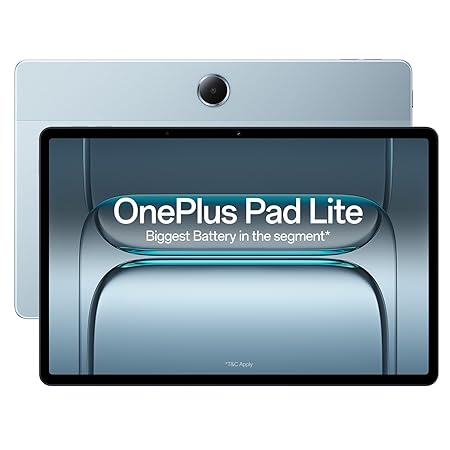
This is the one I’d buy for recorded lectures, PDFs, YouTube and weekend films when flagship performance isn’t the goal. Its 11-inch 16:10 LCD suits widescreen video, 90Hz keeps scrolling pleasant, and four speakers add real value. The 9,340mAh battery is reassuring for a full day on campus.
The Helio G100 and 6GB of RAM suit ordinary apps, not ambitious gaming or editing. Open Canvas can place notes beside a lecture, but don’t expect laptop-level multitasking. This Wi-Fi model also lacks SIM connectivity and active Stylo support. Keep the jobs simple and it makes sense.
Best for: Students, families and casual users who want a straightforward Wi-Fi tablet.
- 👍 11-inch 16:10 display suits video and online classes
- 👍 9,340mAh battery has headroom for a study day
- 👍 Four speakers work well for films and lectures
- 👍 Open Canvas enables two-app multitasking
- 👎 Helio G100 is modest for heavy games and editing
- 👎 No active Stylo support for handwritten notes
- 👎 Wi-Fi-only listing has no independent mobile data
OnePlus Pad Go 2 5G – best for students who work on the move
The Pad Go 2 is the practical middle choice. Its 12.1-inch 2.8K screen gives documents and split-screen apps more room than the Lite, while 120Hz keeps scrolling smooth. This variant has 5G, so poor hostel Wi-Fi or a long train journey doesn’t force phone tethering. The Dimensity 7300-Ultra and 8GB RAM handle research tabs, calls and office apps comfortably.
It’s also the better student option for handwritten notes because it supports the Pad Go 2 Stylo. The pen costs extra and there’s no magnetic keyboard connector. Its 10,050mAh battery lasts well, but 33W charging is slow. A reflective screen outdoors and no fingerprint reader are the other real irritations.
Best for: Commuting students and field workers who need a sharp screen, stylus support and their own data connection.
- 👍 Standalone 5G works away from reliable Wi-Fi
- 👍 Sharp 12.1-inch 2.8K, 120Hz display
- 👍 Active stylus support makes notes practical
- 👍 8GB RAM and Open Canvas handle daily multitasking
- 👎 33W charging is slow for the large battery
- 👎 No magnetic connector or official keyboard
- 👎 Reflective display and no fingerprint sensor
OnePlus Pad – the compact performance bargain if you find it
The original OnePlus Pad still has an appealing balance. Its Dimensity 9000 is much stronger than the chips in the Lite and Pad Go 2, while the 11.61-inch 7:5 display reaches 144Hz. That shape is good for long pages, documents and two visible apps. At 552g, it’s also easier to carry than newer large-screen flagships.
The 9,510mAh battery, 67W charging and six speakers remain competitive. The catch is age: its remaining software-support runway is shorter than a new model’s. This listing also has fixed 128GB storage, no SIM and no fingerprint reader. Consider it when the availability and gap from newer models make sense.
Best for: Buyers who want strong performance and a smooth display without moving to a 13-inch tablet.
- 👍 Dimensity 9000 has ample power for games and multitasking
- 👍 11.61-inch 7:5 display gives documents more room
- 👍 144Hz refresh rate feels fluid
- 👍 67W charging beats the Lite and Pad Go 2
- 👎 Older model has a shorter support runway
- 👎 128GB storage has no microSD expansion
- 👎 No native cellular connection or fingerprint reader
OnePlus Pad 4 – the premium choice for work and demanding games
If the tablet will spend half its life beside a keyboard, the Pad 4 is the clear work pick. Its 13.2-inch 3.4K display gives Open Canvas space for several apps, while the Snapdragon 8 Elite Gen 5 tackles demanding games, large files and creative work. Eight speakers suit films and presentations, and the 13,380mAh battery is made for long sessions.
It’s still Android, not Windows, so specialist desktop software can break the laptop-replacement dream. The 672g body is tiring to hold and the panel remains LCD rather than OLED. The Smart Keyboard and Stylo Pro cost extra, while this listing has no cellular data. Those compromises matter unless you’ll use all that power.
Best for: Power users who want a large Android workspace for multitasking, gaming and creative apps.
- 👍 Flagship Snapdragon chip handles demanding work and games
- 👍 Large 13.2-inch 3.4K, 144Hz display
- 👍 13,380mAh battery supports long sessions
- 👍 Eight speakers add presence to films and calls
- 👎 Large 672g body is tiring to hold
- 👎 Display is LCD rather than OLED
- 👎 Keyboard and stylus cost extra; no cellular data
Frequently Asked Questions
Which is the best OnePlus tablet in India for most people?
The OnePlus Pad Go 2 is the best-balanced choice. It combines a sharp display, 8GB RAM, useful multitasking and stylus support. Pick the 5G version for work away from Wi-Fi; choose the Lite for basic streaming and classes.
Which OnePlus tablet is best for students?
The Pad Go 2 suits students who need PDFs, handwritten notes and optional 5G. The Pad Lite is better on a tighter budget when you mainly watch lectures, browse and type notes.
Is the OnePlus Pad 4 suitable for office work?
Yes. Its large display and Open Canvas suit email, documents, calls and multi-app research. Add the optional keyboard for frequent typing, but keep a laptop if you rely on Windows-only software or specialist peripherals.
Do OnePlus tablets support a SIM card and 5G?
The Pad Go 2 5G featured here accepts a SIM and uses mobile data independently. The Pad Lite Wi-Fi, original Pad and Pad 4 listings do not; they need Wi-Fi or phone tethering.
Can I use a OnePlus Stylo with every OnePlus tablet?
No. The Pad Lite lacks active Stylo support, the Pad Go 2 uses its compatible Stylo, and the Pad 4 supports Stylo Pro. Match the exact accessory name before ordering.
Is a OnePlus tablet good for watching Netflix and other streaming apps?
Yes. The Pad Lite’s 16:10 shape suits widescreen video, while 7:5 models favour documents and multitasking. App certification can affect playback quality, so check recent owner reports for your main streaming service.
The bottom line
For the broadest mix of study, entertainment and mobility, I’d choose the OnePlus Pad Go 2 5G. Its display, RAM, stylus support and independent data connection justify carrying it. Pick the Pad Lite for classes, browsing and video on a tighter budget.
The original OnePlus Pad is the compact performance option if you’re comfortable with fixed storage and an older model. Choose the Pad 4 only when you’ll genuinely use its power and 13.2-inch workspace; otherwise, its size and accessory costs are unnecessary.
As an Amazon Associate we earn from qualifying purchases — at no extra cost to you. We don’t print prices or ratings here because they change daily; tap through to Amazon for the current price and latest reviews.