Best Acer Monitor in India for Work, Gaming and Everyday Use
Acer’s India range stretches from compact office screens to seriously quick QHD gaming panels, and the model names don’t make choosing easy. An EK, Vero and Nitro can sit surprisingly close together on a shopping page while being meant for very different desks.
If you’re looking for the best Acer monitor in India, start with what you do for most of the day. A 21.5-inch Full HD screen makes sense on a narrow study table. A 23.8-inch IPS model is the safer all-round size for spreadsheets, classes and casual gaming. At 27 inches, Full HD favours screen space while QHD gives text and games a visibly finer image.
I checked the current Amazon India listings, compared the specifications with Acer’s own material and read owner discussions for the recurring catches. These five are live, relevant choices with different strengths. I haven’t physically tested them, so the recommendations below stick to verified features and honestly reported tradeoffs.
How to choose an Acer monitor without paying for the wrong features
These six details matter more than the longest feature list.
- Match size to resolution. Full HD looks sharp at 21.5 and 23.8 inches. At 27 inches, QHD is better for small text, design and close viewing.
- Choose the panel deliberately. IPS keeps colour consistent from wider angles. VA usually gives deeper blacks, but dark motion can smear more.
- Check the refresh path. 120Hz and 144Hz improve games and everyday scrolling. The Nitro needs DisplayPort for 200Hz; its HDMI input tops out at 144Hz.
- Count the ports. One HDMI suits one computer but becomes awkward with a console. None of these models offers one-cable USB-C docking.
- Fix the ergonomics. Every included stand is tilt-only. Add a sturdy riser or compatible VESA arm if the top edge sits below eye level.
- Protect the setup. Use an earthed socket and surge protector. A UPS is sensible where Indian power cuts or voltage dips are frequent.
The Acer monitors worth shortlisting
Acer EK220Q J0 (21.5-inch) — the compact desk pick
The EK220Q J0 is the sensible answer when a 24-inch screen would crowd your books, keyboard or office files. Its 21.5-inch Full HD VA panel packs text neatly, while the 120Hz refresh rate makes scrolling and casual games feel much smoother than an old 60Hz display. AdaptiveSync, an anti-glare surface and Acer’s flicker and blue-light controls round out a useful everyday package.
Use HDMI to get the full refresh rate; VGA is there for an older office PC, not the best experience. The stand only tilts, and there is no DisplayPort, USB-C or claimed built-in audio on this India listing. I would pick it for a tight desk, not for side-by-side spreadsheets or a console-heavy setup.
Best for: Students, reception desks and small work-from-home corners that cannot spare much width.
- 👍 Compact 21.5-inch footprint suits narrow Indian study tables
- 👍 Full HD resolution stays crisp at this screen size
- 👍 120Hz over HDMI makes scrolling and casual play feel smooth
- 👍 VA panel and AdaptiveSync suit films and entry-level gaming
- 👎 Small screen feels cramped for two full-size windows
- 👎 One HDMI plus VGA limits modern multi-device setups
- 👎 Tilt-only stand and no built-in speakers
Acer Vero V247Y G (23.8-inch) — the workday all-rounder
This is the Acer I’d put on a general work-from-home desk. The 23.8-inch Full HD IPS panel is a comfortable size for documents, browser tabs and video calls, and the 120Hz refresh rate keeps motion pleasantly fluid. The India listing claims 99% sRGB coverage, a 1500:1 contrast ratio and two 2W speakers. Those speakers save space for calls and lessons, even if they will not replace a proper pair for music.
The Vero angle is practical rather than cosmetic: Acer says the chassis uses a high proportion of post-consumer recycled plastic, and the packaging is recyclable. The catch is familiar. You get tilt rather than height adjustment, and the listed HDMI-plus-VGA connection set is basic. A VESA arm solves the posture problem, but adds cost.
Best for: Office work, study and shared family use where readable text and built-in audio matter.
- 👍 23.8-inch IPS panel is a comfortable size for everyday work
- 👍 120Hz refresh and AdaptiveSync cover work and casual gaming
- 👍 Claimed 99% sRGB coverage is useful for routine creative tasks
- 👍 Dual 2W speakers and VESA support reduce desk clutter
- 👎 Tilt-only stand has no height, swivel or pivot adjustment
- 👎 No USB-C docking and only one modern video input is listed
- 👎 Built-in speakers are for calls and videos, not room-filling sound
Acer EK240Y P6 (23.8-inch) — the value gaming pick
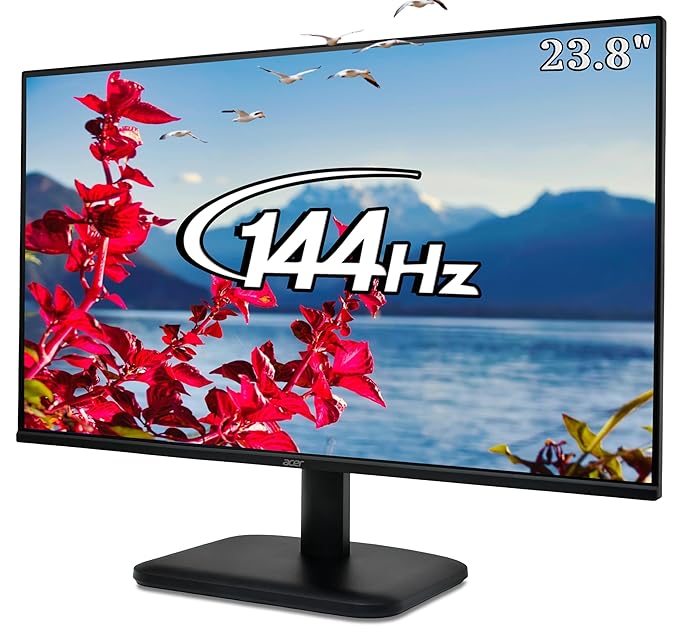
The EK240Y P6 puts the money where a budget gamer will notice it: a 23.8-inch IPS panel, Full HD resolution, AMD FreeSync and up to 144Hz over HDMI. It is a neat match for an affordable gaming PC because 1080p is easier to drive than QHD. The size also keeps text sharper than it would look on a 27-inch Full HD panel.
There are clear compromises. You get one HDMI and one VGA input, no speakers, and a light tilt-only stand. Acer’s 1ms figure is a VRB motion-blur mode, not a promise that every pixel transition behaves that way in normal use. Buyer discussions also flag confusion between speaker and non-speaker EK240Y variants, so buy by the full P6bi model code and assume you need external audio.
Best for: Budget PC gamers who also need a sensible screen for classes, browsing and office work.
- 👍 144Hz Full HD output suits affordable gaming PCs
- 👍 IPS panel offers wide viewing angles and consistent everyday colour
- 👍 AMD FreeSync helps reduce tearing with compatible hardware
- 👍 23.8-inch size balances game immersion with text sharpness
- 👎 Single HDMI input is restrictive for a PC and console setup
- 👎 No built-in speakers on this P6bi listing
- 👎 Light, tilt-only stand offers basic ergonomics
Acer Nitro VG270U X1 (27-inch QHD) — the serious gaming choice
The Nitro VG270U X1 is the clear performance step-up here. Its 27-inch IPS panel runs at 2560×1440, so games and desktop text look appreciably sharper than on the SA272 P1. Acer lists up to 200Hz through DisplayPort, FreeSync Premium, a 90% DCI-P3 gamut, two HDMI inputs, DisplayPort and two 2W speakers. It is also the easiest model here to keep connected to a PC and console together.
Do not buy it for the HDR10 badge alone. With modest listed brightness and no local dimming, HDR impact will be limited. The 200Hz mode needs DisplayPort; HDMI is capped at 144Hz. The stand still only tilts, which feels stingy on a gaming monitor this capable. IPS glow and backlight bleed can vary by unit, so inspect dark scenes and solid colours during the return window.
Best for: PC gamers who want QHD detail and fast motion without stepping up to 4K.
- 👍 QHD resolution is sharp and well matched to a 27-inch screen
- 👍 Up to 200Hz over DisplayPort with FreeSync Premium
- 👍 Two HDMI inputs plus DisplayPort handle several devices
- 👍 Wide colour gamut and IPS viewing angles suit games and creative work
- 👎 Tilt-only stand lacks height, swivel and pivot adjustment
- 👎 HDR10 has limited impact at the listed brightness level
- 👎 Maximum 200Hz requires DisplayPort; HDMI tops out at 144Hz
Frequently Asked Questions
Which is the best Acer monitor in India for most people?
The Vero V247Y G is the balanced everyday pick. Gamers should choose the EK240Y P6 for Full HD or the Nitro VG270U X1 for QHD.
Is a 24-inch or 27-inch monitor better for office work?
Choose 23.8-inch Full HD for a shallow desk. At 27 inches, QHD is noticeably cleaner for documents, coding and design.
Do I need 120Hz or 144Hz for normal work?
No, but both make scrolling and cursor movement smoother. Remember to select the higher rate in your operating system after connecting the monitor.
Can Acer monitors run at their maximum refresh rate over HDMI?
It varies. The Full HD picks use HDMI for their high-refresh modes. The Nitro needs DisplayPort for 200Hz and reaches 144Hz over HDMI.
Are built-in monitor speakers good enough?
They are fine for calls and spoken videos, but headphones or separate speakers sound fuller. The Vero and Nitro include basic speakers; the two EK models do not.
What should I check as soon as an Acer monitor arrives?
Set the native resolution and refresh rate, then check solid colours for dead pixels, severe bleed or tinting. Test every input and keep the box.
The bottom line
For a normal work-and-home desk, I would buy the Acer Vero V247Y G. Its 23.8-inch IPS panel, 120Hz refresh and speakers cover the widest range of daily jobs without taking over the desk. The EK220Q J0 is the better fit when space is genuinely tight.
Gamers have a cleaner split. Pick the EK240Y P6 for responsive Full HD gaming on a modest PC. Choose the Nitro VG270U X1 when you have the graphics power for QHD and want sharper detail, faster motion and more ports. Budget for a riser or VESA arm if the tilt-only stand leaves the screen below eye level.
As an Amazon Associate we earn from qualifying purchases — at no extra cost to you. We don’t print prices or ratings here because they change daily; tap through to Amazon for the current price and latest reviews.